Staying safe online: Why a pet’s name isn’t a good password

23 October 2024

Think of a number between 1 – 10…

It’s a well documented phenomenon that a lot of people will have chosen 7. People can be predictable. So when it comes to choosing a PIN to protect your most valuable data, despite there being 10,000 possible 4 number variations to select, research shows that around 25% of people will use one of those found in this top 20 list:

1234 1111 0000 1212

7777 1004 2000 4444

2222 6969 9999 3333

5555 6666 1222 1313

8888 4321 2001 1010

Passwords don’t fare much better in the research, with people still using P@ssword2, pets and relatives names and birthdays, and other predictable variations. And using these same PINs and passwords for everything. It’s like handing your, and possibly your employer’s, sensitive information to a hacker on a silver platter.

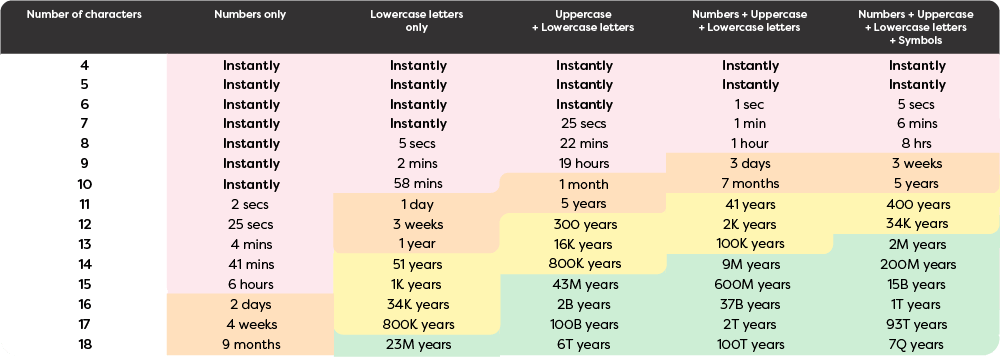
You may have seen various iterations of the below image doing the rounds on socials a while back saying password character length matters. Sorry but size really doesn’t matter, it really is what you do with it that counts!

Why does this matter?

Our finances, essential services, communications with friends and family are mostly online now. If you’re using the same password or PIN across all your accounts, one breach can see your bank account drained, your friends scammed, and your identity used to set up accounts and impact your credit rating and future lending ability.

MBIE published the sobering statistic in 2025 that scams had cost Kiwis almost $265 million that year. In 2024 the incidents were reducing but the losses are increasing. CertNZ’s Q2 report (1 April – 30 June 2024) noted a 3% increase from Q1 in terms of direct financial losses with some of this increase attributed to incidents of ‘Unauthorised Access’ – unauthorised use of passwords to enter accounts.  

Making sure your security is tip-top:

Use passphrases – 4 or more random words or a full sentence – but don’t use well-known quotes!

Try not to have a pattern – if you can guess the next password in this sequence, so can a hacker

MyF@veband01

MyF@veband02

MyF@veband03

What could the next one possibly be?!?!?!

Test your password strength, and patience, using this online game

Where MFA is available, use it!

Use a password manager – if you can remember all your passwords, you’re not doing it right! If you’re an iPhone user, iOS18 has a Password Manager app built in – read about it here. For Android users and those who like to research their options, here are some reviews from the boffins at Wired Magazine and Google has their own version here

Where a Passkey is offered, embrace the future! A growing number of organisations, like Air New Zealand, offer this option to secure your account. Find out more about what passkeys are and how they work here

Make sure you keep your devices updated as recommended – don’t ignore those notifications. 

Check if your information has been involved in a data breach

You can check if your information linked to an email address has been found in any data breaches by putting each address into this website https://haveibeenpwned.com . If instances are found, even historical ones, it’s best to be safe and change your passwords asap – using the handy hints we’ve set out above! 

Give Kiwi Mobile a go

3 months free when you bundle with power or broadband.

First three months free applies to base Kiwi Mobile plan charges only for the first 3 months when you also take Electric Kiwi Power or Broadband. Broadband and Power charges are not discounted. Offer ends 31.05.2026. Fair use, eligibility criteria and T&Cs apply.

Related Articles